



An AI coding assistant can produce a working function in seconds. Whether that actually saved time depends on what happened next: how long it took to check the function was correct, whether it matched the rest of the codebase, whether it handled the edge cases the task required, and whether a bug slipped through that took longer to find than writing the function by hand would have.
That's the real question this article works through: not whether AI coding assistants are useful — they clearly can be — but specifically where they tend to reduce effort and where they tend to shift effort into a different, sometimes larger, form of work. The answer depends heavily on the task, not on the tool.
What an AI Coding Assistant Actually Does
An AI coding assistant generates code, explanations, or suggested edits based on a prompt and whatever context it has access to — the current file, related files, a description of the task, or in agentic modes, the ability to search the repository and run commands itself. Tools like GitHub Copilot and Claude Code operate this way, ranging from inline autocomplete suggestions to conversational chat interfaces to more autonomous agent modes that can plan and execute multi-step changes.
What it does not do is understand the business the code serves, know which conventions matter, or verify its own output against the project's actual requirements. GitHub's documentation on responsible use of Copilot agents is direct about this: AI-generated output should be reviewed, tested, and validated before being relied on, like any other proposed code change.
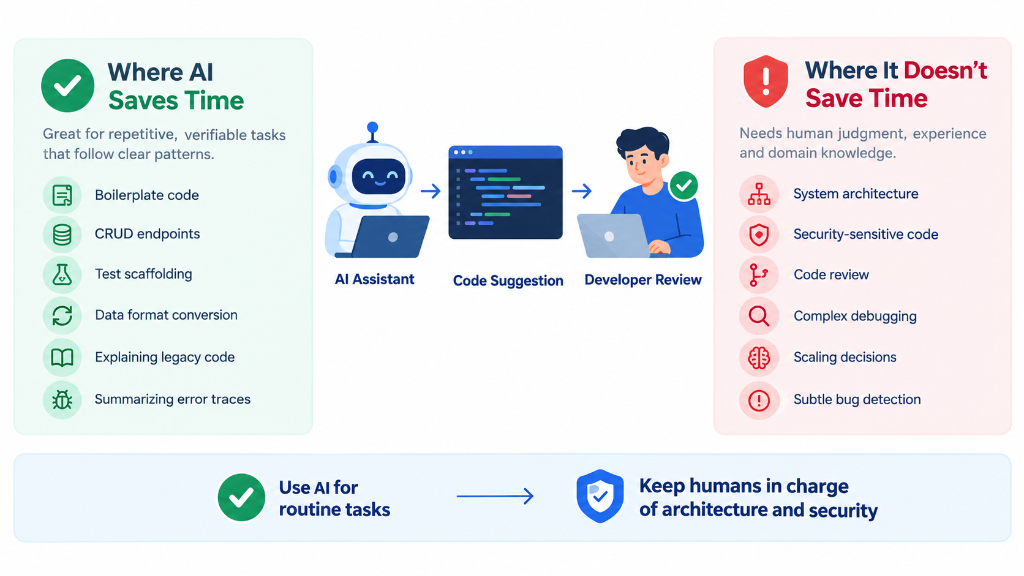
Where AI Coding Assistants Can Save Time
1. Boilerplate and Repetitive Code
Repetitive, conventional code — a new CRUD endpoint following the same pattern as ten existing ones, a data class with standard getters and validation, a config scaffold — is where AI assistance tends to save real time. The pattern already exists elsewhere in the codebase; the assistant is largely reproducing a known shape. Verification is fast here too, since the developer already knows what "correct" looks like.
2. Small Transformations and Refactoring
Converting a function from callbacks to async/await, renaming a pattern across a few files, restructuring a data shape — mechanical transformations with a clear, checkable before-and-after state are a strong fit. The developer can usually verify the result quickly by comparing behavior before and after, keeping review cost low relative to the time saved typing it manually.
3. Test Generation and Test Scaffolding
Generating test-suite scaffolding — file structure, common setup/teardown, an initial set of obvious cases — can save meaningful setup time. It still requires checking that the assertions test the right behavior and that important edge cases weren't skipped in favor of the easy, obvious ones an assistant tends to reach for first.
4. Documentation and Code Explanation
Asking an assistant to explain an unfamiliar function, summarize what a file does, or draft an initial docstring or README section is a genuinely strong use case — the cost of being wrong is low and easy to catch, since a wrong explanation is usually obviously wrong once the developer reads the actual code.
5. Exploring an Unfamiliar Codebase
Asking an assistant "where is X handled in this repository" or "what calls this function" can be faster than manual searching, particularly in an agentic mode that can search across files. This works best as a starting point rather than a final answer — the developer still needs to confirm the assistant found the right thing, since it's easy to miss related code it didn't surface.
6. Debugging Assistance
Pointing an assistant at an error message, stack trace, or failing test and asking for likely causes can narrow the search space quickly, especially for common, well-documented patterns. It's most useful as a first pass generating hypotheses to check, not a final diagnosis to trust without confirming the actual cause.
7. Prototyping and Proof-of-Concept Work
For throwaway or exploratory code — validating whether an approach is feasible, or building a rough demo — the correctness bar is lower and speed matters more than polish. This is one of the clearest cases for a lighter review pass, precisely because it isn't heading to production as-is.
Where AI Coding Assistants Don't Save Time
1. Ambiguous Requirements
If the developer can't yet describe precisely what the code should do, an assistant can't either — it will make a plausible-sounding guess that may not match what's actually needed. The time saved on typing is often lost several times over in back-and-forth prompting and rework once the mismatch is discovered.
2. Complex Business Logic
Example (hypothetical): a developer asks an assistant to modify a payroll calculation that includes several overlapping rules — overtime thresholds that vary by role, a shift differential, and a rounding rule that only applies in certain jurisdictions. The assistant produces code that looks complete and passes a quick manual check. But subtle business rules like these are exactly where an assistant is likely to miss an interaction between rules it wasn't explicitly told about, or apply a rule too broadly. Reviewing this kind of change properly requires understanding the actual business requirement well enough to check the logic against it line by line — which is most of the effort the code generation was supposed to save.
3. Large Architectural Changes
Changes spanning many files, multiple system boundaries, or requiring consistent decisions across a large surface area are difficult for an assistant to handle coherently in one pass, even in agentic mode. An incomplete view of the whole system makes different parts of a large change more likely to be internally inconsistent, requiring a developer to review and reconcile the whole thing anyway.
4. Security-Sensitive Code
Example (hypothetical): a developer asks an assistant to fix a bug in an authorization check — a case where a user could access another user's resource under certain conditions. The assistant proposes a fix that resolves the reported symptom but doesn't address the underlying access-control logic, or introduces a new edge case where the check can still be bypassed. GitHub's own guidance on security and quality of AI features states plainly that AI-generated suggestions can be incomplete, insecure, or based on outdated practices, and should be reviewed accordingly. Authentication, authorization, cryptography, and input validation are areas where a human still needs to reason through the actual threat model — an assistant doesn't know what the threat model is unless it's told, and often isn't told everything relevant.
5. Debugging Incorrect AI-Generated Code
Code that looks fluent is easy to trust more than it deserves. A logical error in AI-generated code can take longer to find than a bug in code the developer wrote themselves, since there's no memory of the original reasoning to fall back on — they're debugging someone else's code from scratch, with the added risk of assuming it's correct because it reads cleanly.
6. Large Unfamiliar Repositories With Insufficient Context
When an assistant lacks access to enough surrounding codebase — related modules, conventions, prior decisions — it still produces an answer, just one grounded in guesswork. The result can look reasonable while quietly reinventing something that already exists elsewhere, or missing a convention the rest of the team follows.
7. Changes That Require Extensive Verification
Database migrations, financial calculations, or anything where a mistake is costly and hard to reverse require thorough verification regardless of who or what wrote the code. The verification effort is roughly constant either way, which limits how much net time AI assistance actually saves here.
The Hidden Cost: Reviewing AI-Generated Code
The most common miscalculation is treating code generation as the whole task. The actual workflow looks more like: prompting, gathering the right context, generation, inspecting the output, testing it, debugging anything that's wrong, checking it for security implications, integrating it with the rest of the codebase, and finally approving it. Generation is one step in that sequence, not the whole thing.
Generated code can reduce the amount of typing involved without reducing the amount of engineering judgment required. A ten-line function generated in two seconds can still take fifteen minutes to properly review if it touches logic the reviewer needs to independently verify — and that review time is necessary regardless of how the code was produced.
Reviewing AI-generated code specifically should cover the same ground as reviewing any other code change, with particular attention to a few areas where generated code tends to have blind spots:
- Correctness: does it actually do what was asked, not just something plausible-looking?
- Project conventions: does it match existing patterns, naming, and structure, or introduce a new one?
- Edge cases: are the boundary conditions handled, or only the common case?
- Error handling: are failures handled deliberately, or silently ignored?
- Security: does it introduce or fail to close an access-control, injection, or data-exposure risk?
- Dependency choices: are any new libraries or APIs the assistant introduced actually necessary, current, and appropriate?
- Maintainability: would a team member unfamiliar with how it was produced be able to maintain it?
- Test coverage: do the tests verify real behavior, or were tests weakened or removed to make something pass?
- Performance: where relevant, does the generated approach have any obvious inefficiency a human wouldn't have introduced?
GitHub's guidance on reviewing AI-generated code and the OWASP Secure Coding with AI Cheat Sheet both frame this the same way: AI output is proposed code, not verified code, and it should go through the same — or in security-sensitive areas, a more thorough — review process as code from any other source.
AI-Assisted Development vs. AI-Autonomous Development
There's a meaningful difference between using an assistant to help with a step a developer is actively directing, and letting an agent work more autonomously across a larger task with less step-by-step supervision. Autonomous modes can be efficient for well-scoped, well-tested tasks, but raise the stakes of review, since more code changes before a human looks at any of it. Less supervision during generation means more thorough review is needed afterward — the two trade off against each other rather than autonomy being a strict improvement.
A Practical Workflow for Using Coding Assistants
- Define the task as precisely as possible before prompting — vague input tends to produce output that needs to be redone.
- Provide relevant context — related files, existing conventions, and any constraints the assistant wouldn't otherwise know about.
- Ask for a small change rather than a large one where practical; smaller changes are easier to verify and easier to catch problems in early.
- Inspect the proposed solution before running anything, not just after something fails.
- Run tests — existing ones, and new ones if the change isn't already covered.
- Review edge cases the happy-path tests might not exercise.
- Review security-sensitive areas specifically, if the change touches auth, data access, or user input.
- Integrate the change and confirm it behaves correctly alongside the rest of the system, not just in isolation.
- Document important decisions, especially anything non-obvious the assistant introduced that a future reader would need explained.
Breaking a large task into smaller ones is worth doing whenever a single prompt would require the assistant to make several judgment calls it isn't well positioned to make — each smaller step gives the developer a natural checkpoint to verify correctness before compounding it with the next step.
When to Accept, Edit, Reject, or Avoid AI-Generated Code
| Response | When it fits |
|---|---|
| Accept as-is | Output matches conventions, passes tests, and covers the task's actual scope with no meaningful edge cases missed |
| Edit before using | Core approach is sound but details need adjustment — naming, error handling, a missed edge case |
| Reject and retry | Output misunderstood the task or context; a revised prompt with better context is likely to do better |
| Reject and write manually | Task is complex, ambiguous, or security-sensitive enough that writing it directly is more reliable than reviewing a generated version |
| Avoid using an assistant for this task | Task requires extensive domain judgment the assistant has no way to access, or the review cost would exceed the generation benefit |
Decision Framework: Where AI Assistance Tends to Help
Descriptive guidance based on task characteristics, not a fixed or universal ranking — the right call still depends on the specific codebase, task, and team:
| Task | AI usefulness | Human review needed | Why |
|---|---|---|---|
| Boilerplate | Often useful | Light | Pattern is established elsewhere; easy to verify against existing examples |
| Simple refactoring | Often useful | Moderate | Mechanical transformation with a checkable before/after state |
| Unit-test scaffolding | Useful with review | Moderate | Saves setup time, but coverage and assertion quality need checking |
| Documentation | Often useful | Light | Low cost if wrong, easy to spot-check against the actual code |
| Code explanation | Often useful | Light | Errors are usually obvious once compared to the real code |
| Debugging | Useful with review | Moderate | Good for generating hypotheses; root cause still needs confirming |
| New feature implementation | Useful with review | Moderate to high | Depends heavily on how well-specified the feature is |
| Database migrations | Review-intensive | High | Mistakes are costly and can be hard to reverse |
| Authentication/authorization | Review-intensive | High | Security consequences of a subtle error can be significant |
| Security-sensitive code | Review-intensive | High | Requires threat-model reasoning the assistant doesn't have |
| Architecture changes | Human-led | High | Spans too much context and too many decisions for reliable one-pass generation |
| Complex business rules | Human-led | High | Subtle rule interactions are easy for a model to miss or misapply |
Practical Checklist Before Merging AI-Assisted Code
- Is the task clearly defined before prompting?
- Did I provide enough project context for the assistant to work from?
- Is the generated code limited to the requested scope, or did it change unrelated things?
- Does it follow existing project conventions?
- Did I inspect every changed file, not just the ones I expected to change?
- Did I verify any APIs, libraries, or dependencies the assistant introduced?
- Did I run relevant tests, including existing ones?
- Did I check edge cases beyond the obvious happy path?
- Did I review error handling rather than assuming it's adequate?
- Did I review any authentication or authorization changes specifically?
- Did I review security-sensitive code with appropriate care?
- Did I check for unnecessary complexity the assistant may have introduced?
- Did I confirm the generated code actually solves the problem as specified, not just a plausible version of it?
- Did I inspect the final diff in full before merging?
- Did I verify that no existing tests were removed or weakened to make something pass?
- Would I be comfortable maintaining this code later without remembering how it was generated?