



Apple's App Review evaluates submitted apps against the App Review Guidelines, developer agreements, and standards for safety, performance, design, and user privacy.
Submission oversights can cause review friction, prolong evaluation, or trigger rejection. Incomplete metadata, unstable binaries, offline backends, and missing credentials often prevent reviewers from completing assessments. Careful preparation eliminates these avoidable issues.
However, preparation does not guarantee approval. Each build is evaluated independently, and review duration varies with complexity and platform factors. While eliminating known failure points reduces friction, not every flaw automatically causes a delay.
1. Submit a Final and Functional Build
Apple's App Review Guidelines require developers to submit a final, functional app. Under Guideline 2.1 (App Completeness), incomplete bundles, demos, betas, and prototypes are ineligible for App Store distribution; prerelease testing requires TestFlight.
Binaries must be free of placeholder text, empty websites, and temporary content. Referenced URLs—including privacy policies and terms—must be functional. Developers must test on physical hardware, as builds that crash or exhibit obvious technical problems can be rejected immediately.
2. Make App Store Metadata Accurate
Under Guideline 2.3 (Accurate Metadata), app descriptions, screenshots, previews, promotional text, category selections, and age ratings must accurately reflect the software in the submitted build.
Screenshots and previews must showcase the app in use on supported screen sizes rather than conceptual graphics. If an app requires subscriptions, credentials, or companion hardware, metadata must disclose those prerequisites clearly. Developers must keep metadata updated as features evolve.
3. Give App Review Full Access
Guideline 2.1 requires developers to provide App Review with full access to the app. If features require authentication, subscriptions, or hardware permissions, reviewers must have resources needed to evaluate them.
When an app requires login, developers must supply an active demo account with valid credentials in App Store Connect, pre-populated with sample data. For multi-factor authentication, enterprise SSO, or physical QR codes, developers must provide a demo mode, bypass mechanism, or sample resources.
4. Keep Backend Services Available
If an app relies on server databases, authentication endpoints, or APIs, those dependencies must remain live and reachable throughout review. Offline servers cause timeouts or blank screens that halt evaluation.
Authentication endpoints must process logins, and APIs must return required data. Firewalls and geographic filters should permit review traffic from Apple. Apple does not require a specific hosting architecture or uptime tier; backend services simply must be accessible during review.
5. Explain Non-Obvious Features
The App Review Information section in App Store Connect contains a dedicated Notes field. Apple instructs developers to use this field to explain non-obvious features, unusual workflows, and specific operational requirements.
Developers should explain special login flows, unusual navigation, test account details, conditional functionality, and hardware requirements (including video links showing accessories in use). Apple specifically states detailed explanations should be included for non-obvious features and in-app purchases to prevent review delays.
6. Check In-App Purchases
Digital goods, premium features, and auto-renewable subscriptions must comply with Guideline 3.1 (Payments). All In-App Purchases must be fully configured, active, and submitted with the binary in App Store Connect.
Reviewers must be able to test purchases in sandbox mode. Subscription screens must display pricing, billing intervals, and renewal terms clearly. Apple states unclear business models or ambiguous in-app purchases can delay review and trigger rejection; if an item is not readily visible, document its location in review notes.
7. Review Privacy and Data Practices
Under Guideline 5.1 (Legal - Privacy), applications must follow strict rules on data collection, consent, and transparency. Every app must provide a valid privacy policy URL in App Store Connect and within the app, and developers must complete Privacy Nutrition Labels accurately.
When requesting device permissions like camera or location, Info.plist purpose strings must clearly explain why access is needed. Furthermore, Guideline 5.1.1(v) requires apps supporting account creation to offer an accessible in-app account deletion mechanism. Separately, Guideline 5.1.1 also requires proper consent handling when data is shared with third-party SDKs.
8. Check Third-Party SDKs and Services
Apple states developers must ensure all app code complies with App Review Guidelines, including third-party SDKs, ad networks, and analytics frameworks. Non-compliance caused by external libraries is treated as an application failure.
Developers should audit external libraries: ensure analytics and ad SDKs respect privacy manifests and tracking rules, third-party authentication supports 'Sign in with Apple' where required, and digital goods use In-App Purchase. Using third-party SDKs does not cause rejection; issues arise only when integrated code violates platform rules.
9. Avoid Misleading or Incomplete Metadata
Guideline 2.3 explicitly prohibits deceptive metadata, undocumented capabilities, and hidden features. Screenshots, previews, descriptions, feature lists, and privacy disclosures must accurately represent the software in the submitted build.
Marketing copy must not claim capabilities the binary lacks, and age ratings must be configured accurately based on Apple's questionnaire. Furthermore, Apple strictly prohibits code designed to alter app behavior dynamically during review; attempting to hide features or cloak functionality violates developer agreements and can lead to account termination.
10. Check App Store Connect Before Submission
Apple's official documentation defines a standardized sequence for submitting an app version in App Store Connect:
- Select version: Open the app record and choose the editable version.
- Verify build: Attach the release build uploaded from Xcode or CI/CD.
- Complete metadata: Enter app description, keywords, category, and support URL.
- Review contact info: Provide current contact details for reviewer inquiries.
- Add demo credentials: Supply active credentials in Demo Account fields if required.
- Add review notes: Document non-obvious features or link to demonstration videos.
- Submit: Complete declarations, add version to queue, and submit.
11. What Can Actually Slow the Review Process?
While many submissions move through review on routine timelines, Apple's documentation identifies specific conditions that can extend review duration:
- Complex applications: Novel technical architectures or regulated apps require greater scrutiny.
- Unclear business models: Ambiguous monetization or unclear In-App Purchases require extra investigation.
- Repeated violations: Submitting builds that repeatedly fail for the same guideline makes review take longer.
- Review manipulation: Misrepresenting features or attempting to circumvent review triggers thorough investigation.
Apple does not publish guaranteed turnaround times or fixed review schedules; developers should avoid relying on speculative timelines when scheduling launches.
12. What to Do if Apple Rejects the App
If an app is rejected, Apple documents the decision in the Resolution Center. To resolve it methodically:
- Read notice: Identify cited guidelines and examine attached logs or screenshots.
- Identify changes: Determine whether the fix requires updating metadata or code.
- Fix root issue: Address the core issue and verify the fix on physical hardware.
- Communicate if needed: Reply in Resolution Center if reviewer guidance is unclear.
- Resubmit: Upload a new binary or update metadata with explanatory notes.
- Appeal if appropriate: Submit an appeal to the App Review Board if the app complies.
Key Review Verification Areas
This table summarizes essential verification areas based on Apple's review standards:
| Area | What to check | Why it matters |
|---|---|---|
| Build | Correct final build | Reviewer needs the intended version |
| Metadata | Accurate information | Must represent the actual app |
| Login | Working demo access | Reviewer must be able to access required features |
| Backend | Services available | App functionality may depend on them |
| Review Notes | Special instructions | Helps reviewer understand non-obvious functionality |
| Purchases | Complete and functional | Required when applicable |
| Privacy | Accurate data disclosures | Must align with Apple's requirements |
Common Submission Problems
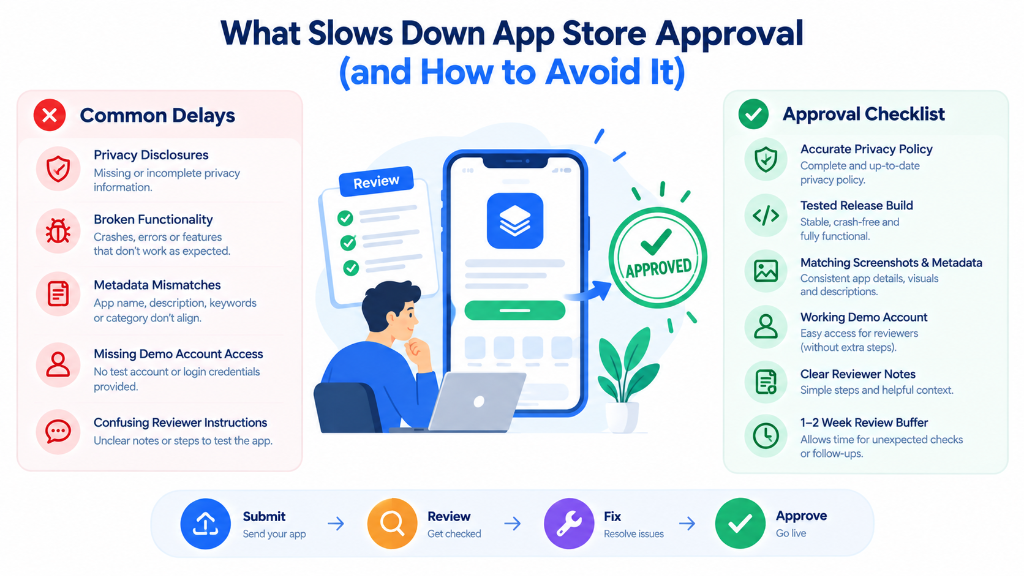
Most submission delays stem from practical operational oversights. Teams should routinely check for these common problems before submitting:
- Broken login: Credentials that fail or trigger unhandled multi-factor challenges.
- Expired demo credentials: Passwords or tokens that expire before review begins.
- Unavailable backend: Servers offline or blocking review traffic via firewalls.
- Crashes: Unhandled exceptions or launch failures on physical hardware.
- Unfinished features: Inactive buttons or placeholder screens in views.
- Placeholder content: Temporary copy, mock data, or developer notes left in views.
- Incorrect screenshots: Store assets showing interfaces not present in the build.
- Inaccurate metadata: Descriptions or promotional copy exaggerating app capabilities.
- Unexplained features: Custom gestures or hidden menus left undocumented in notes.
- Inaccessible purchases: In-App Purchases failing to load or test in sandbox mode.
- Missing privacy disclosures: Undisclosed tracking or missing
Info.plistpurpose strings. - Broken URLs: Support, terms, or privacy links returning 404 errors or leading to empty websites.
These items represent practical issues to verify; whether an individual defect results in rejection depends on its severity during review.
Final Submission Workflow
Development teams should execute this structured sequence before submitting:
Build → Test on Device → Verify Functionality → Verify Metadata → Verify Privacy → Test Reviewer Access → Verify Backend → Check Review Notes → Verify App Store Connect → Submit
The binary is compiled and tested on physical devices. Metadata, previews, privacy disclosures, and permissions are audited. Demo credentials and backend APIs are verified. Finally, instructions are added to App Review Notes, and all App Store Connect fields are verified before submission.
Practical Pre-Submission Checklist
This 16-point checklist outlines essential items developers should verify before submitting an app for review:
- Final build selected: Confirm intended release binary is attached in App Store Connect.
- App tested on-device: Test directly on physical devices running production operating systems.
- Crash/bug testing completed: Verify user workflows execute without crashes or freezes.
- Core functionality verified: Check that advertised features and controls operate properly.
- Functional URLs checked: Confirm privacy, terms, and support URLs resolve to active pages.
- Placeholder content removed: Remove temporary text, empty websites, and placeholder elements.
- Metadata reviewed: Verify app title, description, and keywords match the actual software.
- Screenshots verified: Ensure store screenshots accurately reflect current user interfaces.
- Privacy disclosures: Disclose data collection, tracking, and usage in Nutrition Labels.
- Permissions reviewed: Ensure
Info.plistpurpose strings explain why permissions are needed. - Demo account tested: Verify review credentials grant full access to account features.
- Backend verified: Ensure server APIs and databases remain live and reachable.
- App Review Notes completed: Document non-obvious features, required hardware, or test instructions.
- In-App Purchases tested: Ensure digital items are active, complete, and testable in sandbox mode.
- Third-party SDKs reviewed: Verify external libraries comply with platform privacy rules.
- Submission review completed: Confirm contact information, age ratings, and export declarations.